Yewee 1.0
Tune for small faces
Find the faces in a whole audience from a wide shot, keep their numbers steady, and keep false faces out.
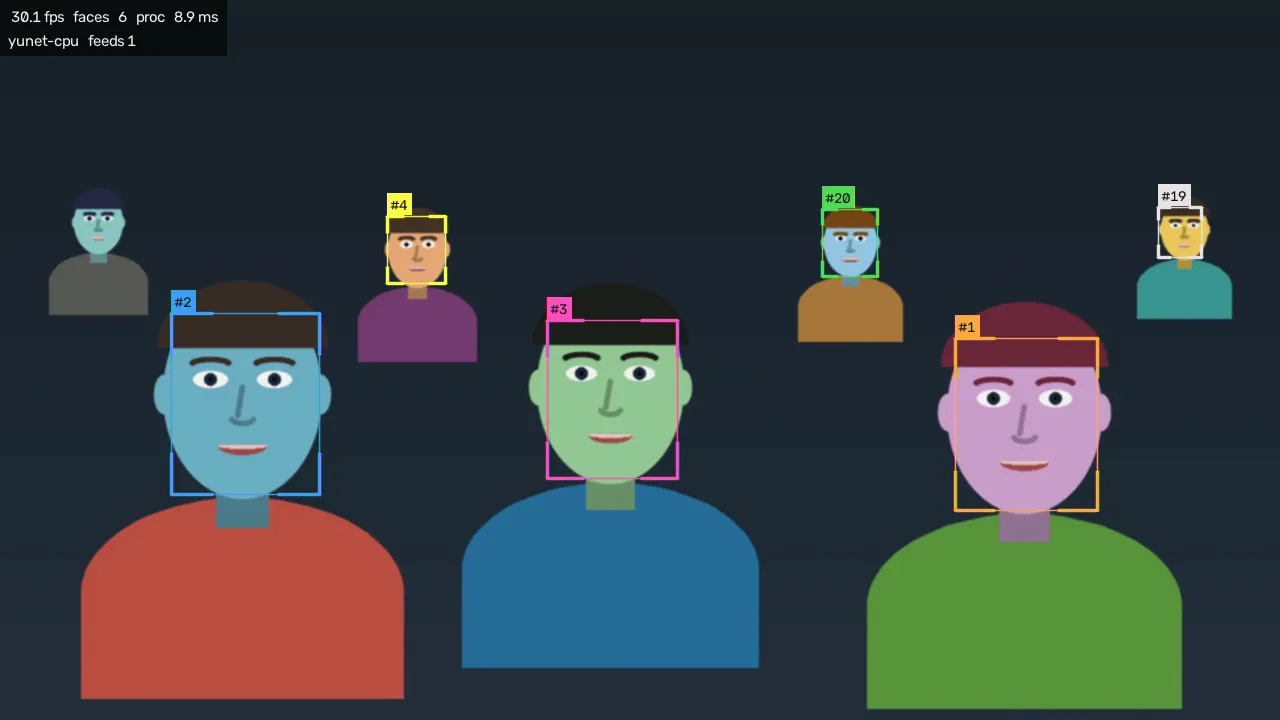
A wide shot of a crowd is the hardest thing you can ask of Yewee: the faces at the back may be only a dozen pixels across. Four settings in the Face finding card decide how many of them it finds, and one preset sets them for you.
Start with the preset
Tap Wide crowd in the presets. It sets Search detail to Fine (960), Strictness to 0.35, Ignore small faces to 0 and the detector to every frame. Watch the faces count in the header, then adjust from there.
The four settings
Search detail: how closely Yewee looks
Faces are found on a scaled-down copy of each frame. Search detail is that copy's width: Fast (480), Balanced (640), Fine (960) or Maximum (1280). More detail finds smaller faces and costs more time on every frame.
With the standard detector (YuNet), there is no point going above the source's own width: on a 1280 × 720 source, Maximum is the same as the picture itself. A 1080p source is where Fine and Maximum help most.
Strictness: how sure it must be
Small faces are found with less certainty, so lowering Strictness finds more of them. It also lets through more false faces: a pattern on a shirt, a poster, a light. 0.35 is a good start for a crowd; go lower in steps of 0.05, and stop when boxes start appearing on things that aren't faces.
A box appears only once a face has been found twice, so a false hit that lasts one frame never gets a number.
Hold lost faces: keep numbers steady
In a crowd, small faces are missed now and then: someone looks down or raises a drink. Hold lost faces keeps the box for that long while waiting for the face to come back, so it keeps its number. Raise it (to about 1 s) if numbers keep changing on the same people. Lower it if boxes linger after people have left.
Detector pace: every frame
Keep Detector pace at Every frame for small faces. Skipping frames saves time, but the boxes drift between detections, and small faces are the first to be lost.
Keep the back rows out
Sometimes you want the opposite: a close shot of the front row with distant faces ignored. Ignore small faces drops every face smaller than the size you set, measured on the source picture.
Stage close-up sets it to 40 px with Strictness 0.60.
Watch the cost
Each step up in Search detail costs more time for the detector. Keep an eye on the load chip and on the Face finding row of the Performance card. If load goes over 100%, Auto relief steps in: at its third step it caps Search detail at 640 until there's room again, and your setting comes back by itself.
If you need the detail and the machine can't keep up, turn off what you don't need first: Expressions, the People silhouette cutout, feeds nobody takes.
On a Windows machine with an NVIDIA GPU
The Accurate — CenterFace detector runs on an NVIDIA graphics card, where Fine and Maximum detail cost little. It finds faces the standard detector can miss in a big, wide shot.
- Install NVIDIA's CUDA 12 runtime and cuDNN for CUDA 12, from NVIDIA. Yewee's installer can't include them. Recent cards (the RTX 50 series) need CUDA 12.8 or later.
- Restart Yewee.
- In Face finding, leave Detector on Auto, or choose Accurate — CenterFace. The hint underneath should say
running: CenterFace on NVIDIA GPU. - Tap Wide crowd, then try Search detail at Maximum.
If the hint says on CPU, CUDA isn't working yet: Yewee carries on with the standard detector (on Auto) or CenterFace on the processor (if you chose it), which is slower than YuNet there. --doctor shows what it found.
On a Mac, or a PC without an NVIDIA card, stay with Auto, which uses YuNet. CenterFace runs there too, but more slowly, for little gain.
Camera and lens
Settings can't find a face the camera didn't resolve. For a whole audience:
- Send the highest resolution the machine can handle: 1080p puts half as many pixels again across every face as 720p.
- Zoom in from further back rather than going wide from close in: it evens out the size of front and back rows.
- Light the audience, even a little. Faces in the dark are the first to go.