Light 1.0
Dials, pulses and nudges
Live control over stored looks — dials that move many parameters at once, beat-locked pulses and envelopes, and nudges you can keep or discard.
Looks are what is stored. Everything on this page changes what the rig does now without rewriting the looks, until you decide to keep it. Dials and pulses are built on the Controls tab in the Build view (⌥4, then Controls beside Look).
Nudging
A nudge is a live value that drives the rig in place of what a look has stored. The show file isn't touched and nothing goes into undo until you keep it.
These are always nudges:
With nudge switched on in the look editor, every fader in the editor becomes a nudge too. With it off, editor faders edit the look itself, and each edit can be undone.
A nudged fader and its tab dot turn amber, and the held chip counts them.
Keep
Writes every nudge into the looks, so they play that way next time they fire. It can be undone. The keyboard key is K, or use Keep in the held chip's list.
Discard
Throws the nudges away. Each value travels back to what the look has stored, over that look's own fade. The keyboard key is D, or use Discard in the held chip's list.
ALL STOP and switching shows also drop every nudge.
Blind
With blind on, nudges and dials show only in the audition pane. The rig keeps the stored look.
Dials
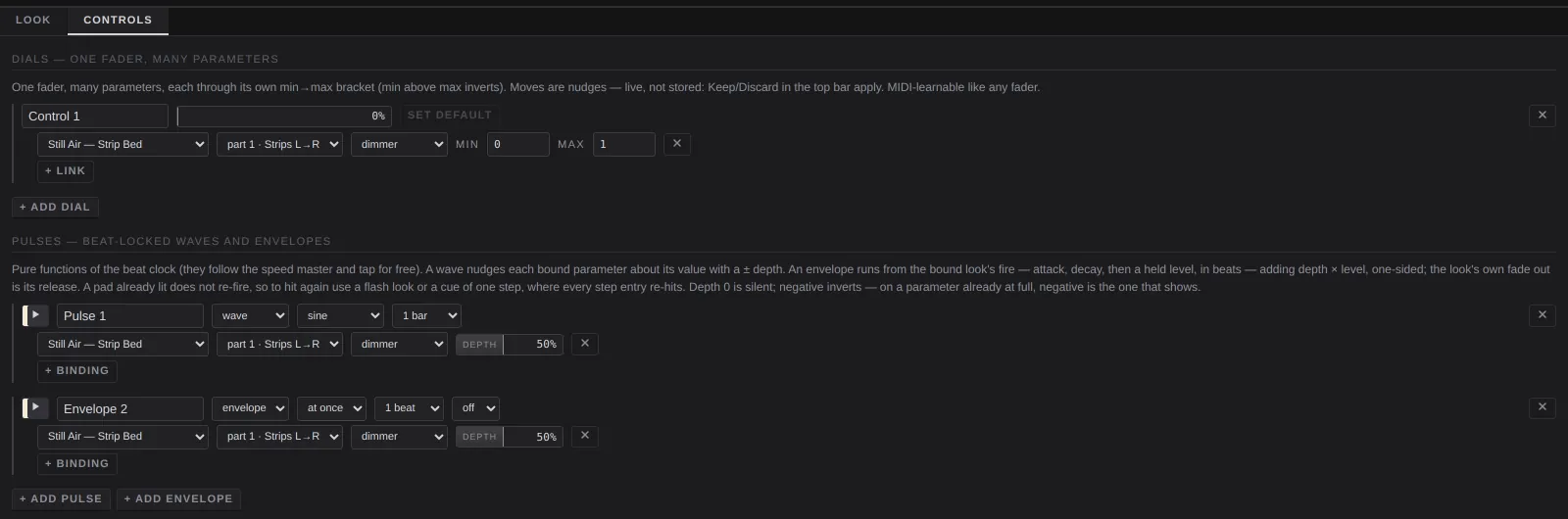
Dials — one fader, many parameters. A dial is a single fader that moves any number of parameters in any looks, each within its own range. Dials also appear in the dials row under the pads, where you can play them. Moving one is a nudge.
+ add dial
Adds a dial called Control N.
Name
What the dials row shows.
Fader
The dial's live position. It can be MIDI-learned like any fader.
Set default
Saves the dial's current position as its stored default.
Delete dial
The ✕ at the right. It deletes the dial and any MIDI mapped to it.
Links
Each link row is one parameter the dial drives:
- look: which look. The dial does nothing until that look is on stage.
- part: which part of it, and so which fixtures.
- parameter: a part's setting, or a fader of one of its effects.
- min and max: the value at the bottom and top of the dial. Set min above max to make the dial work backwards.
- ✕ removes the link.
+ link adds another. A link to a look, part or effect that no longer exists is flagged and skipped. On the pads page, the dial shows ⚠.
Dials for this look
In the dials row, dials for this look makes a dial for each of the selected look's first eight parameters in one go.
Pulses
Pulses — beat-locked waves and envelopes. A pulse moves parameters of looks in time with the beat, on top of whatever the looks and any nudges have set. Pulses follow the tempo, the speed fader and tap.
+ add pulse
Adds a wave pulse: a sine, one cycle a bar, running.
+ add envelope
Adds an envelope pulse. It runs once each time a bound look fires: straight to full, a one-beat decay, nothing held.
Run and stop
The ▶ button at the left of each pulse. When stopped, bound parameters sit at their base value.
Name
Anything you like.
Wave or envelope
- wave repeats every cycle. Choose the shape (sine, triangle, ramp up, ramp down, square, random) and the rate (8 bars down to 1/4 of a beat).
- envelope runs from each fire of the bound look. Choose the attack (beats from the fire to full: at once, 1/8, 1/4, 1/2, 1 beat, 2 beats, 1 bar, 2 bars), the decay (beats from full down to the held level) and the sustain (the level held until the look fades out: off, ¼, ½, ¾, full).
A look that is already lit doesn't fire again. To hit an envelope again, use a flash look or a steps look of one step.
Bindings
Each binding row is one parameter the pulse moves: look, part, parameter, and a depth from −100% to +100%. At 0 it is silent. Negative depth inverts the pulse, which is the one that shows on a parameter that is already at full. + binding adds another. A pulse can't bind to an effect's rate.
Delete pulse
The ✕ at the right of the pulse.