Light 1.0
Effects
Every control on an effect row, the wave shapes and rates, how a spread fans an effect across a group, and the effects catalogue.
An effect moves one parameter of a part in a wave, locked to the tempo. A part can have as many effects as you like. They sit under the part's feature tabs in the look editor.
Adding effects
+ effect
Adds a plain effect: a sine wave on dimmer, one cycle a bar, full size, no spread. Change it from there.
Browse…
Opens the catalogue of ready-made effects.
Apply from pool…
Appears once you have saved effects to the pool. Pick one to add a copy to this part.
Effect row
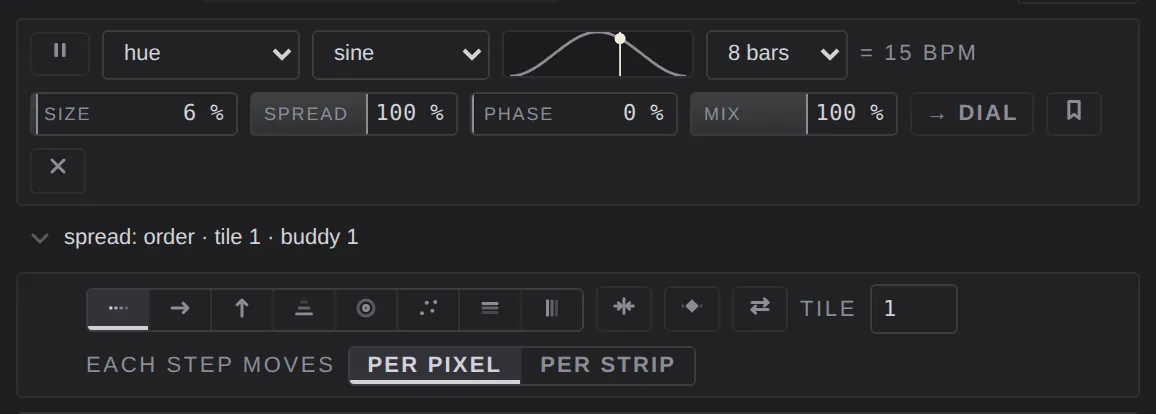
Park
The ❚❚ button at the left. It keeps the effect but stops its output. Click again to bring it back.
Target
The parameter the wave moves: dimmer, hue, white, strobe, pan, tilt, zoom, focus, beam size, soften, warmth, gobo spin, prism spin, flower spin or shape.
If the group's fixtures don't have that parameter, you can still choose it, but it is flagged in amber and does nothing until you retarget the effect or the part's group changes.
Wave
The shape of one cycle:
- sine: a smooth swell.
- triangle: straight up, straight down.
- ramp up and ramp down: a sawtooth.
- square: hard on and off. width sets how much of the cycle is on.
- chase: one head at a time. It forces a full spread.
- random: a new level each step.
- curve: one you draw yourself (see Wave strip).
Shape
When the target is shape, pan and tilt trace a figure together, and the figure replaces the wave: circle, figure of eight or square.
- aspect: round at 50% (the default). All the way left is a flat pan sweep; all the way right is a vertical bounce.
- turn: rotates the whole figure. A sideways figure of eight becomes an upright one at 25%.
- ↻ / ↺: clockwise or anticlockwise.
Wave strip
The small picture of one cycle, with a dot showing where the wave is now. With the curve wave you draw in it: drag a point to move it, drag the middle of a segment to bend it, double-click to add a point, and right-click a point (or hold ⌥ and click) to remove it. The dashed line after the last point is the level the wave holds until the cycle starts again.
Rate
How long one cycle lasts, in musical time: 8 bars, 4 bars, 2 bars, 1 bar, 2 beats, 1 beat, 1/2 or 1/4 of a beat. Beside it, = N BPM shows what that comes to at the current tempo. Because the rate is musical, effects stay in time when the tempo changes. The speed fader multiplies every rate.
Size
How far the wave swings, 0 to 100%. At 0 it does nothing.
Spread
How the wave is fanned across the fixtures in the group, 0 to 100%. At 0 every head moves together. At 100% the heads are spread over one whole cycle, so the wave rolls across the group. The spread options set the order.
Width
On square and chase only: how much of each cycle is on, 50% by default.
Phase
Shifts the whole effect later in its cycle, 0 to 100%. Use it to put two effects out of step with each other.
Mix
How much of the effect reaches the output, 0 to 100%. At 100% (the default) it's the full effect; lower values blend it back towards the part's stored value.
Dial
→ dial points a dial at one of this effect's faders.
Save to pool
The bookmark button. It saves this effect as a reusable preset, which then appears in apply from pool… on every part.
Remove
✕ deletes the effect.
Spread options
The line under an effect, spread: order · tile 1 · buddy 1, says how the wave is handed out. Click it to open the options.
Distribute
The order the wave runs through the heads:
- patch order: one after another, in the group's order.
- left → right: across the stage, by where each fixture is.
- bottom → top
- upstage → downstage
- out from the middle: a ripple from the group's centre.
- scattered: a random order that stays the same until you re-roll it with the reshuffle button.
- pixel rows and pixel columns: through each fixture's own pixels, so every fixture runs the same wave.
Mirror
Folds the order in half, so both ends move together and sweep toward the centre.
Centre
The middle leads and the ends trail.
Reverse
Runs the order backwards.
Tile
Repeats the spread N times across the group, from 1 to 64.
Each step moves
On fixtures with several pixels:
- per pixel: the wave runs through every pixel of every fixture.
- per strip: a whole fixture at a time; its pixels share one phase.
The number beside it (buddy, 1 to 64) makes that many neighbours share a phase.
Catalogue
browse… opens 54 ready-made effects in four groups. Click one to hear it: it goes onto the part at once, so the rig and the stage show it. Clicking another swaps it. Press keep to keep the one that is playing, or cancel (or Esc) to take it back out.
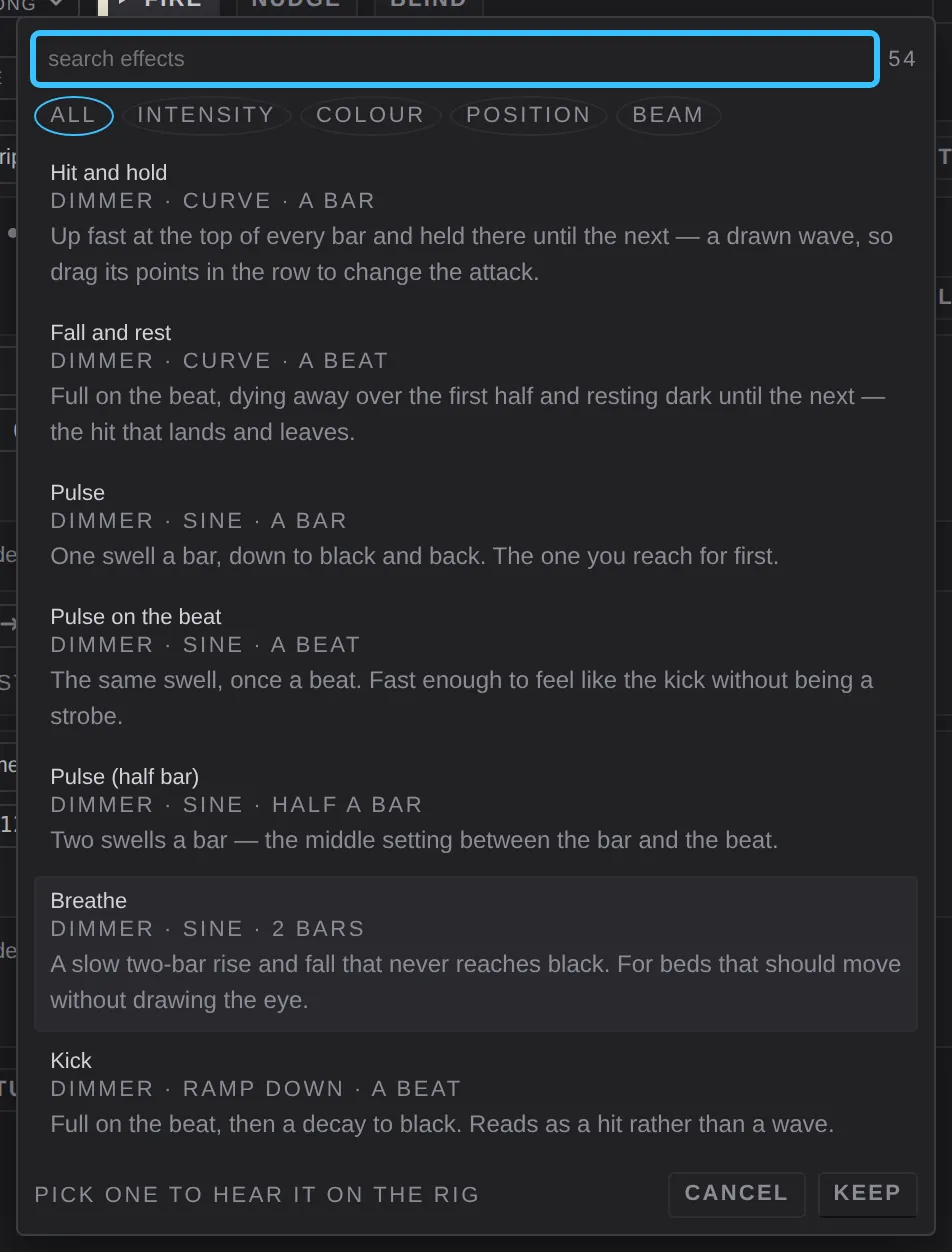
- search effects filters by name. The number beside it is how many match.
- The chips filter by group: all, intensity, colour, position, beam.
- Each entry shows its target, wave and rate, and one line about what it is for.
- An entry marked ⚠ needs a parameter this group doesn't have.
Intensity
Hit and hold · Fall and rest · Pulse · Pulse on the beat · Pulse (half bar) · Breathe · Kick · Kick (bar) · Build · Stutter · Gate · Flicker · Chase · Chase (fast) · Chase (soft) · Sweep across · Ripple from the centre · Wings · Scatter · Two-arm chase · In pairs · Roll up the rig · Strobe stab · Random strobe hits · Strobe chase
Colour
Rainbow · Rainbow (fast) · Rainbow across · Rainbow from the centre · Colour drift · Colour wobble · Two-tone flip · Colour chase · White flicker · White accent
Position
Pan sweep · Pan wings · Tilt bounce · Tilt wave · Slow drift · Circle · Circle, chasing · Figure of eight · Figure of eight, upright · Box · Flat oval · Pan scatter
Beam
Zoom breathe · Zoom punch · Beam size pulse · Soften swell · Warmth drift · Gobo rock · Prism rock