Crewbox 1.0
Import a patch sheet
Bring a festival master patch or any spreadsheet into Crewbox as a CSV, check it, fix it, and keep it live.
Most patches already exist as a spreadsheet: the festival's master patch in Google Sheets, a console export, last year's file. Import it once as a CSV and it becomes a live sheet every device edits together, and its acts become the event's running order.
1. Export the CSV
From Google Sheets: File → Download → Comma-separated values, with the master patch tab selected. From Excel or Numbers: export or save as CSV.
Export the one tab you want. A CSV holds one tab, and a workbook exported whole often flattens the two-row act headers that Crewbox reads.
2. Import it
Open Patch Sheets → All sheets… in the sidebar, then either:
- press ⇪ Import CSV and pick the file, or
- drag the file onto the page. Drop a CSV to import it as a new sheet appears while you hold it over.
Crewbox opens the new sheet and shows what it did in a notice:
56 channels, 5 act(s), then anything it's unsure about: skipped columns
it didn't recognise, kept separate columns for repeated names when two
columns carry the same act name, and any changeover that disagrees with the set
times.
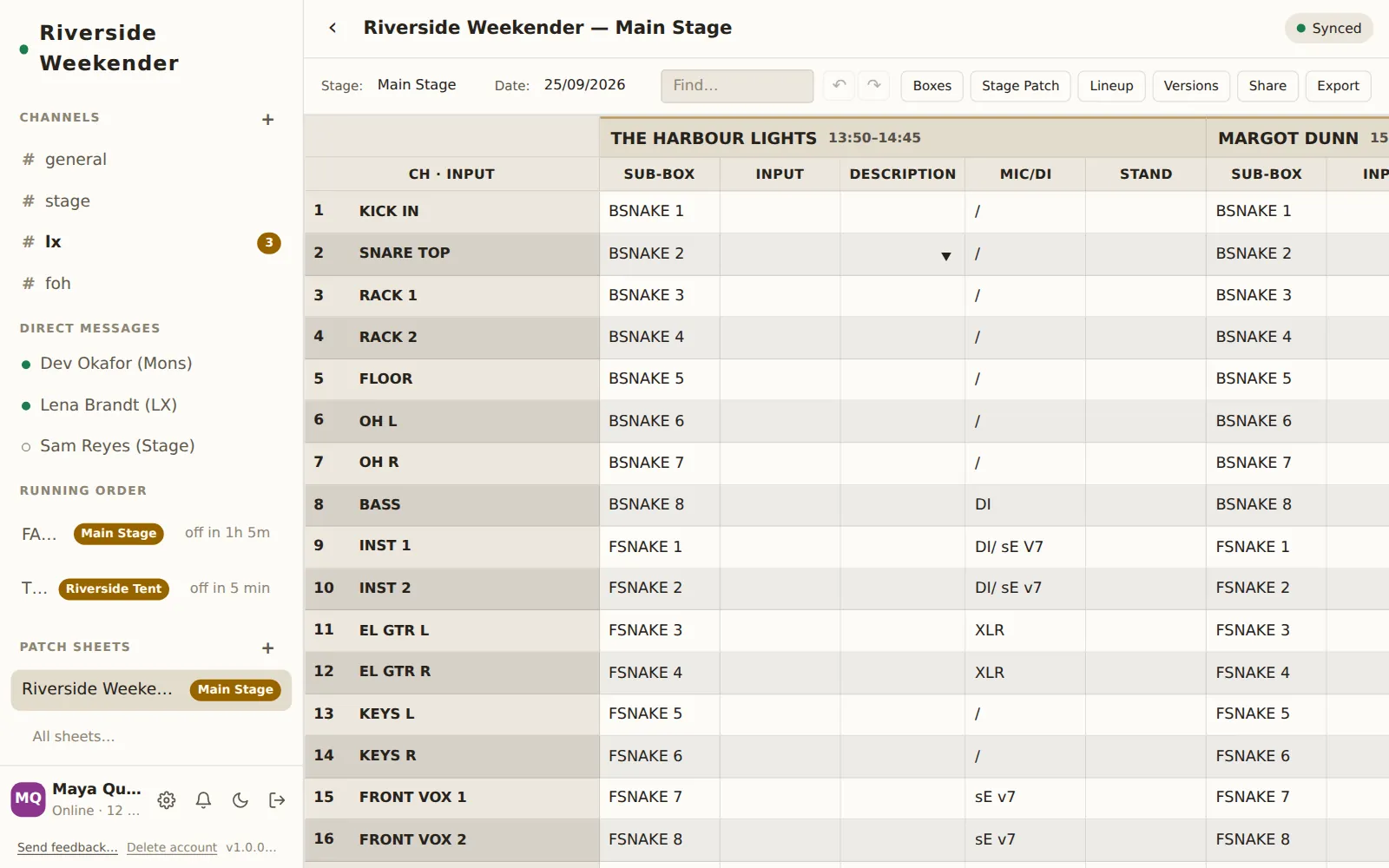
The sheet's title is the file name; click it to rename.
What Crewbox understands
A plain grid. One header row, one row per channel. Headers are matched by meaning, not exact words:
| Column | Recognised when the header is, or contains |
|---|---|
| Channel | is ch, chan, channel, no, num or # (a number after it is fine) |
| Sub-box | contains sub or box |
| Input | contains input, instrument or source |
| Description | contains desc or name |
| Mic/DI | contains mic or transducer, or is di |
| Stand | contains stand or clip |
A festival master patch. The shape real festival sheets have: a title row, a colour legend for the sub-snakes, a day, then a two-row header where act names span their columns and CH / SUB-BOX / MIC repeats under each act, with the house inputs down the side. Crewbox recognises the structure rather than particular words, and pulls out:
- the channels and their house inputs;
- each act, its set time (
Start - End) and spec; - the sub-boxes, with the colours and stage positions from the legend;
- the changeovers written between acts.
45,45m,45 mins,HR,1hr,1 hour,1h30,1:30and90all read as the minutes they look like.
3. Put it on a stage and a day
In the sheet's toolbar, set Stage: (for example Main Stage) and Date:
(DD/MM/YYYY). The acts move with the sheet onto that stage and day in the
running order. The countdowns in everyone's sidebar come from these times, so
if the file had no set times, add them now in Lineup, or in the
running order itself.
Import the same file again later (a second sheet for the same stage, or a re-import after a correction) and its acts are matched to the ones already there rather than listed twice. A blank time in the file leaves a time someone fixed by hand alone.
4. Check it
- Boxes: are the sub-boxes, colours and stage positions right?
- Stage Patch: pick each act and look for ⚠ Two channels on one tail.
- Lineup: set times, changeovers, and the ⚠ the set times leave … warning where a written changeover disagrees with the gap the times imply. Crewbox doesn't guess which is right; fix whichever is wrong.
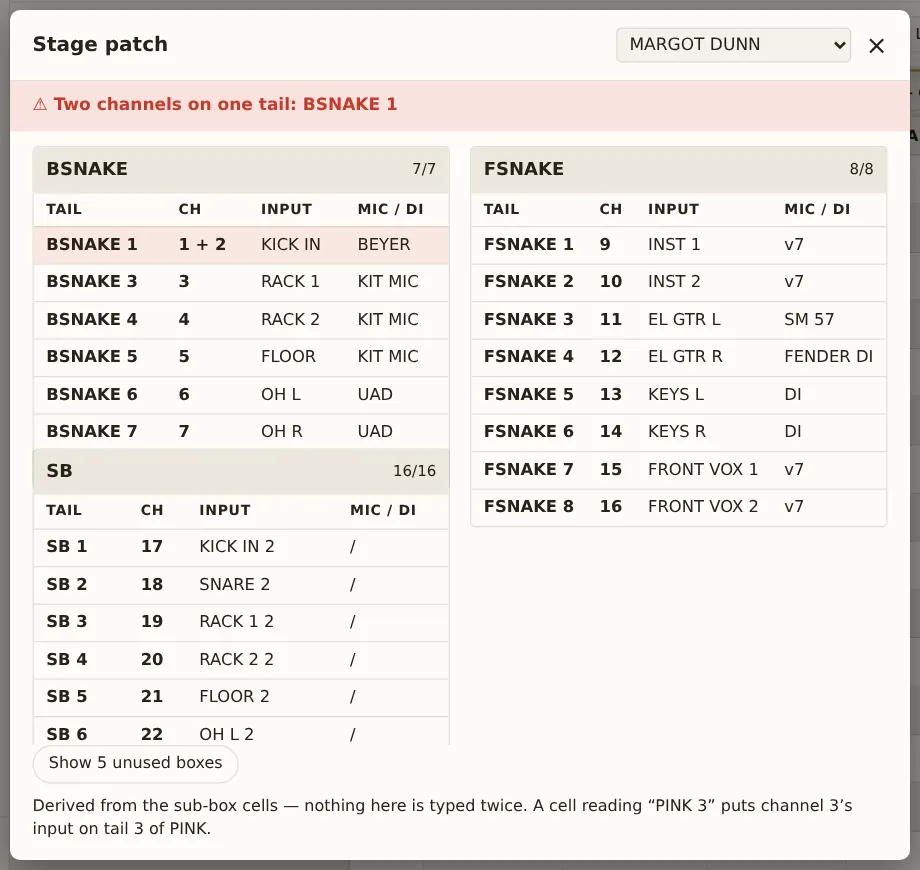
Every control is described in Patch sheets.
5. Keep it live
From here the sheet is edited in Crewbox, not the spreadsheet. Edits appear on every device as they're typed, and work offline, syncing when the device is back in reach.
- Late changes from the spreadsheet: copy the block of cells there, click the grid cell where its top-left corner should go, and paste. New channels are added if the block runs past the bottom; the notice says what didn't fit; the whole paste is one undo.
- Before doors, after soundcheck: Versions → Save current version, so you can go back.
- Send it to someone: Share posts a link in a channel. Export downloads the grid as CSV for the PA company.
If it looks wrong
- Columns are missing. Look at skipped columns in the notice. Rename those headers in the spreadsheet to ones in the table above and import again.
- Everything came in as one act called "Act 1". The two-row act header was lost. Export the master patch tab on its own.
- A changeover warning. Not an error: the sheet's written changeover and its set times disagree. Check both against the printed running order.
- "Not a CSV". Only
.csvfiles import here. Save the spreadsheet as CSV first.