Crewbox 1.0
Troubleshooting
Start from the symptom - joining, connecting, voice, alerts, missing messages, lighting levels, and problems with the box itself.
The problems crew hit come first. Problems for the box's operator are at the end. For anything about the box itself, start with Admin → This box: every row that isn't working comes with its fix.
I can't join
- The join page never loads. You aren't on the event network. Join the Wi-Fi named on the poster, then scan again. Some phones hold on to mobile data, so turn it off for a minute to force the phone onto the Wi-Fi.
- "That name is taken and the PIN doesn't match. Pick another name, or use your PIN." Someone has already joined with that name, and the PIN you typed isn't theirs. If the name is yours, you've mistyped or forgotten your PIN: ask the operator to press Reset PIN beside your name in Admin → Crew. If the name isn't yours, pick another.
- "Wrong event PIN — check the join poster". The event PIN may have been
changed. Read it off the current poster or
/connect, not a photo from yesterday. - "Too many attempts — wait a minute and try again". The box limits guessing. Wait a minute.
- "Can't reach the crew server". The phone is on a network, but not one where it can reach the box. The screen retries by itself. Retry now tries straight away.
It says Connecting and never loads
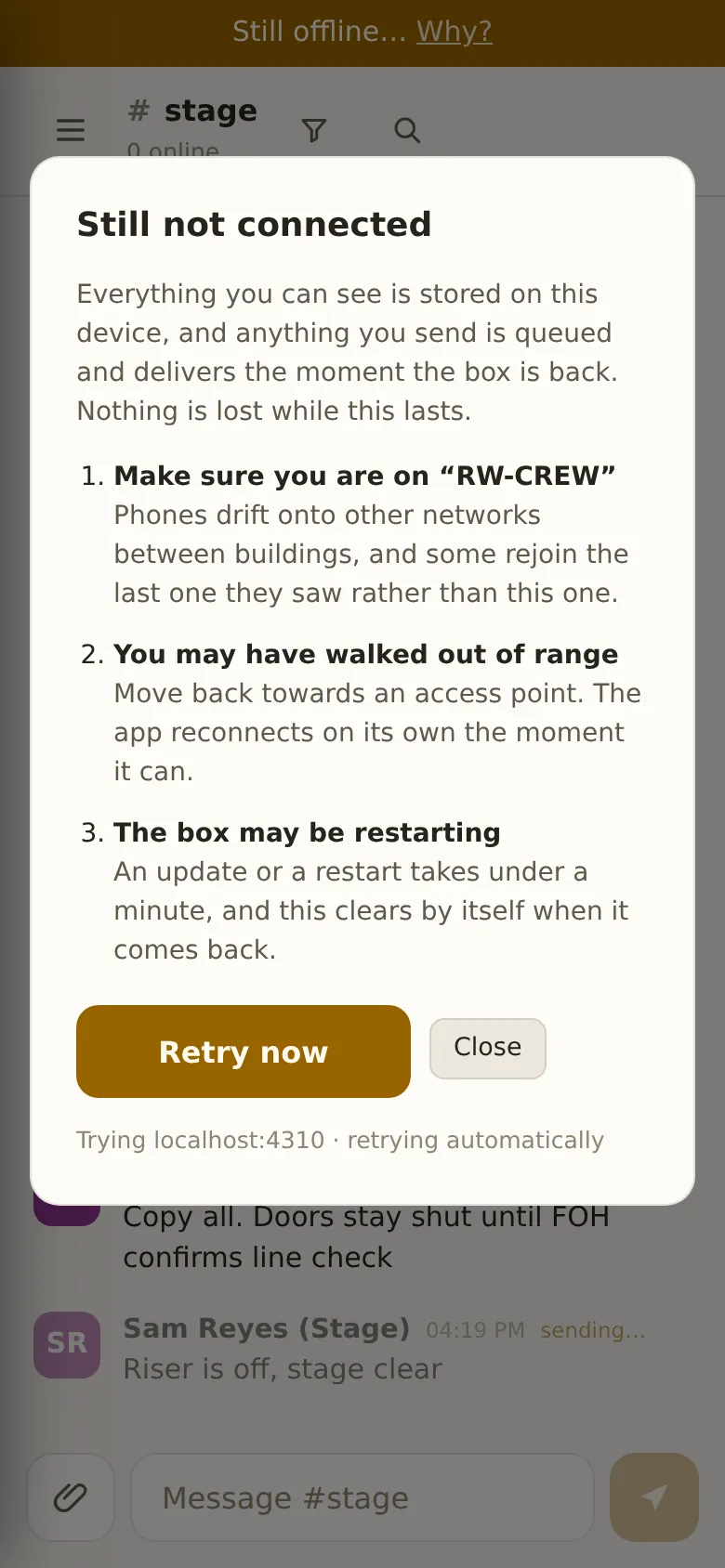
Once the app has been opened on a device, it starts from the device's own copy before it has reached the box. A Connecting… banner means the box isn't answering. After half a minute the banner changes to Still connecting… Why?. Tap it for the likely causes on your kind of phone.
On an iPhone, look at the Wi-Fi symbol in the status bar. If it's gone, the iPhone has decided the network has no internet and moved to mobile data, which can't reach the box. Turn mobile data off for a minute and the app comes back. Then tell the operator, because there's a proper fix (see below).
Nothing is lost while this lasts. What you can see is on your device, and anything you send is queued and delivered as soon as the box is back.
My message says sending… forever
Your device can't reach the box. The message is safe on your device and will be delivered when the connection returns, so don't type it again. If everyone nearby has the same problem, the box or the Wi-Fi is down. If it's only you, move closer to an access point.
I can hear voice but nobody hears me
Look at the voice bar. If it says listen-only, that's the HTTPS rule: browsers only give a page the microphone over HTTPS. Use the Android app, or ask the operator whether the box has HTTPS.
If you're not listen-only, open the gear on the voice bar and watch the Mic level meter while you speak. If the bar stays flat, the wrong microphone is chosen, or the browser was refused permission to use it. Check the site's permissions, usually under the padlock in the address bar.
I'm not getting alerts
- Check that the bell beside your name isn't muted (it has a line through it when muted).
- Alerts from a browser in the background need notification permission. The browser asks once. If it was refused, turn it back on in the site's settings.
- A locked iPhone on a site with no internet can't get alerts. Apple delivers them through its own servers, and no app can get round that. Give roles that mustn't miss a call an Android phone with the Crewbox app, which alerts on the lock screen over the event network alone.
A channel looks empty, or messages are missing
If the filter bar is open, close it. The filter only shows matching messages among those loaded on your device, and it clears when you change channel. To look further back, use search (⌘K), which searches everything on the box.
The reload pill does nothing
New version available · Reload sometimes needs a few seconds while the new version finishes downloading. Tap it again. If it still does nothing, close and reopen the app. Nothing unsent is lost either way.
The lighting plot shows no levels
Drawings only show what the desk is sending when Levels is on in the live bar. It's off by default. If there's no live bar, or it says Not watching a lighting network, the box isn't listening to the lighting network. That's an operator setting: Admin → This box → Networks → Lighting network listening, then a restart.
The network audit says Not watched
That isn't a fault. The box hasn't been told to watch that network, and the card says what to change. See Network.
For the operator
The box won't start, or the port is in use
A box is probably already running on the machine. crewbox --status shows it,
and crewbox --stop stops it.
iPhones connect but never load
Android phones work, but iPhones show the app stuck on Connecting, with the Wi-Fi still joined. The iPhone has judged the crew network to have no internet and moved to mobile data. This is the most confusing failure there is, because the phone still looks connected.
Every phone checks a fixed address when it joins a Wi-Fi network, to decide whether the network has internet. The box can answer those checks itself, and the Phones stay on this Wi-Fi row in Admin → This box says whether it is:
- Port 80. Phones only check on port 80, which needs admin rights. When
the box can't take port 80, it answers on port 8880 instead and the row says
so. Admin → This box → Download port 80 config has the one forwarding
rule to run on the box machine. Don't test the rule with
curlfrom the box itself, because macOS doesn't redirect a machine's traffic to itself. - DNS. The event router must send the check addresses to the box:
captive.apple.comfor Apple devices, plusconnectivitycheck.gstatic.com,connectivitycheck.android.com,clients3.google.com,www.msftconnecttest.comanddetectportal.firefox.com. The DNS config download (below) has these lines in an optional second block.
To check it worked, join the crew Wi-Fi on an iPhone. The Wi-Fi symbol should stay in the status bar, with no "no internet connection" alert.
Meanwhile, crew can get back in by turning mobile data off.
Crew can't reach the box by its name
If the box has a certificate and a name, Admin → This network checks
whether that name leads to the box. When it doesn't, Download DNS config
saves crewbox-dns.conf, ready for the venue router (dnsmasq, OpenWRT and
Pi-hole, a hosts file, or a BIND zone). If the name leads to a public address,
there's a stale record somewhere, often last event's address or the public
website. Point the router's override at the box's current address, which is on
the terminal banner and in crewbox --status. HTTPS, names and
certificates has the full recipe.
The name works on phones but not on the box's own Mac
The Mac is asking a different DNS server. macOS picks it from the service
order in System Settings → Network, not from the network you're using.
Drag the crew network to the top, or add a line to /etc/hosts with the box's
address and name.
The setup page has gone
/setup closes for good once the first person joins. Everything on it is in
the admin panel. If the admin password is lost, restart the box with
the ADMIN_PASSWORD environment variable set to a new one.
The box crashed
Start it again (Start Crewbox in the Mac menu bar, or relaunch it). The next time the admin panel opens, it asks once whether to send the crash report. Nothing is sent unless you say yes. See Admin → Crash reports.